

Overview
The recommended approach for authenticated scraping is cookie-based authentication, where you:- Login manually to your application
- Extract the session cookie from DevTools
- Use the cookie with Firecrawl to access protected pages
Cookie Expiration Times:
- Internal tools: Often 7-30 days or longer
- Other tools: Often hours or minutes
Setup
Get API Key
Get your Firecrawl API key from firecrawl.dev/app
Install Dependencies
npm
Node.js < v20: If you’re using Node.js version 19 or earlier, you’ll also need to install And import it with
dotenv:import 'dotenv/config' at the top of your file.Method 1: Cookie-Based Authentication
Step 1: Extract Cookies from DevTools
Demo Application: You can practice with our demo app at https://firecrawl-auth.vercel.app
- Email:
test@example.com - Password:
password123
Login to Your Application
Navigate to https://firecrawl-auth.vercel.app and login with the credentials above
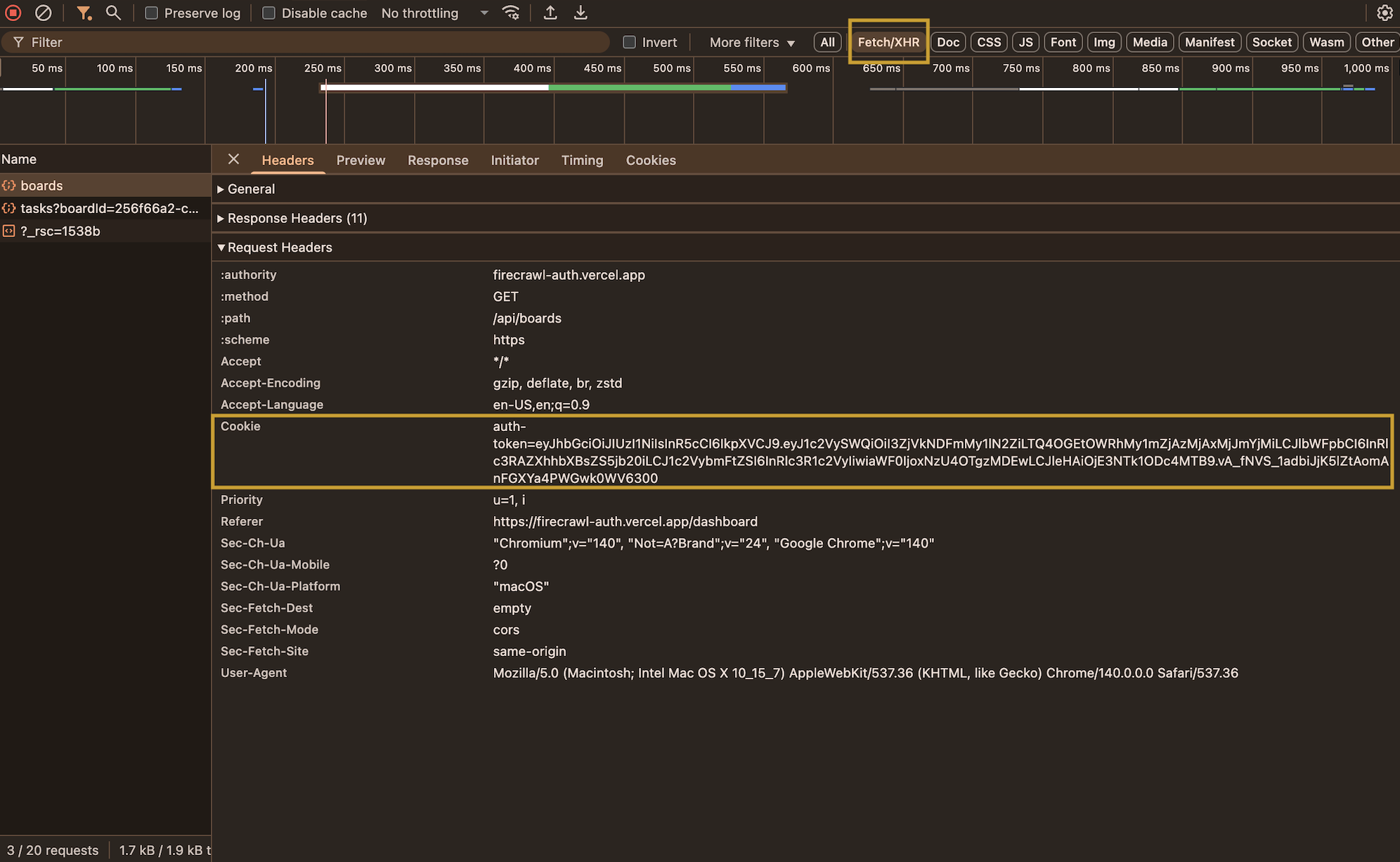
Step 2: Use Cookies with Firecrawl
Best Practices
Cookie Security
- Store cookies in environment variables
- Never commit cookies to git
- Rotate cookies regularly
- Use
.gitignorefor.envfiles
Cookie Expiration
- Check expiration times in DevTools
- Set up alerts before expiration
- Re-extract cookies when they expire
- Consider using form-based auth for short-lived cookies
Rate Limiting
- Respect the application’s rate limits
- Add delays between requests
- Monitor for 429 (Too Many Requests) errors
- Use exponential backoff for retries
Error Handling
- Check for 401/403 errors (expired cookies)
- Validate response content
- Log authentication failures
- Have fallback authentication methods
Troubleshooting
Getting 401 Unauthorized Errors
Getting 401 Unauthorized Errors
Cookie Not Working
Cookie Not Working
Session Expires Too Quickly
Session Expires Too Quickly
For short-lived sessions:
- Use form-based authentication instead
- Automate the login process with actions
- Set up a cron job to refresh cookies
- Consider requesting longer session times from your internal tool’s admin
Cookie Lifespan for Internal Tools: Many internal tools set cookies with 7-30 day expiration times, making them ideal for recurring scraping tasks. Check your cookie’s
Expires field in DevTools to see how long it’s valid.